We had a customer receive a threatening letter from a law firm in Los Angeles recently. The bottom line of the letter - Your network has been used to download copyright protected material illegally. Pay up or we go to court. After I got involved we determined several things. One the customer had recent problems with their Modem/router and had it replaced by their Internet provider. When it was replaced no security was put on their wireless network. It seems that someone got on to their wireless network in the early morning hours and downloaded many movies. The downloads had been going on for a month or two. I found out the law firm that issued the letter is known as a "copyright troll". They have gotten the right to sue from a low budget movie company and had sent out over 20,000 letters threatening the worse.
My advise (and the advise of those who have seen many of these cases) was to 1. secure your Wi-Fi now. 2. get a lawyer. The fines involved are not insignificant. The average settlement is around $750. So let's be clear. If you have a Wi-Fi network that isn't secured, you may be putting yourself in jeopardy of being subpoenaed and having to defend whether you or someone who was on your network downloaded copyrighted material. Lets not even think about if the material was regular or child pornography. Then you could be looking at sexual misconduct charges. These are very scary implications!
So what kind of security should you have on your Wi-Fi network? PCSS recommends using WPA security that is standard on every modern wireless router. You can pick a pass phrase that will let you and those you trust onto the network. Remember that you as the payer of the Internet bill are ultimately responsible for all that is downloaded (and uploaded) on your network. That means if your kids have programs such as LimeWire on their computers, you are at risk for being charged with downloading copyright material. You probably need to check the computers of your employees, family and anyone that might be using your network to see if they have what we call bit torrent downloaders. These programs are designed to download illegal material (songs, films, videos). There is no free lunch. With most songs costing $0.99 to download, why risk a lawsuit by illegal downloading. If you have a business make sure you have a computer use policy that clearly defines what the Internet is to be used for (and not for). Make sure you train your employees in Internet security.
If you have any concerns about your wireless security or Internet security, PCSS provides services to keep your networks safe and review your present security situation.
Sunday, May 5, 2013


Tuesday, April 2, 2013
#224 - IE10 its here whether you want it or not
If you are like most Windows users, you have your computer to automatically get Windows updates and install them. This is recommended by almost all PC experts and PCSS recommends it and has this very set up on ALL our PCs. We should not have been surprised on March 31 when we discovered that Microsoft had decided that Internet Explorer 10 (IE10) was a necessary Windows update. But we were. Actually I did not notice that Internet Explorer(IE) had been updated for a while. I don't use IE for browsing much on my office PC. I have Firefox as my default browser and spend much time on Google Chrome. The latest versions of Firefox and Chrome were better designed and faster then IE9, the last IE version.
I use IE to go to a few sites that seem to work better with IE. One of those is the site I use to order computer product. Imagine my surprise when the page loaded and I couldn't find my old orders or saved orders. The links for them had disappeared. I also immediately noticed that the order site looked smaller then usual - smaller font, buttons, and screen size. Now I wasn't clueless and immediately clicked on the help button and found that my PC had been updated to IE10. Once I knew that piece of information I also remembered from one of my Microsoft seminars that there is a compatibility mode button on the address bar that will let me look at a site just like it was in IE9. I clicked on that (its right next to the refresh button ) and viola everything was back to normal! I have already helped 3 clients out with this gem this week.
So what is IE10 and is it worth the upgrade? IE 10 is Microsoft's browser upgrade to go with its new operating system Windows 8. That is important to remember as we go through the features items. It will work with Windows 7, but not any other operating system (XP, Vista, 2000 sorry!). The first and probably most important upgrade is that IE10 is fast. Its 20%+ faster then IE9 and after doing some checking it is faster then the latest Firefox and is a close 2nd to Google Chrome. Sites just respond faster. When it comes to Browser features, speed is on top. The interface looks very close to IE9. That is it is very sparse and utilitarian. Not much showing on the screen. If you right click in the upper area you can pick the toolbars and features you would like to display. We just use the menu bar.
The biggest hyped new feature it the ability to PIN sites to your Windows taskbar. With this feature you can drag a site you are on to the taskbar (bottom of the screen) and a permanent short cut icon will be located there. For example we went on facebook and dragged the tab to the taskbar and there is our pinned facebook shortcut. But wait its more then just a pretty icon. It can tell you when you have messages, or special friend updates, um just like on your phone! Ah now it clicks in. Microsoft was copying the phone interface into Windows. Not every site can be pinned, but most popular sites seem to work. You can google IE10 pinned sites to get a list.
There are several cosmetic changes (the right scroll bar works like the one in Windows 8) and several upgrades to the HTML5 language compatibility (geek for IE10 is more compatible with new websites then IE9). Open tabs can be closed without having to open the tab (like Chrome & Firefox have had for years!). There are also some excellent privacy settings that make surfing the web safer. Many of the changes in IE10 only are shown if you have Windows 8 and a touch screen PC/Tablet.
So bottom line - Should I upgrade to IE10? The increased speed and security make me want to say yes. Being more compatible with HTML5 can only make IE10 a better browser. We'll keep checking it out, but PCSS will give a YES to this upgrade.
I use IE to go to a few sites that seem to work better with IE. One of those is the site I use to order computer product. Imagine my surprise when the page loaded and I couldn't find my old orders or saved orders. The links for them had disappeared. I also immediately noticed that the order site looked smaller then usual - smaller font, buttons, and screen size. Now I wasn't clueless and immediately clicked on the help button and found that my PC had been updated to IE10. Once I knew that piece of information I also remembered from one of my Microsoft seminars that there is a compatibility mode button on the address bar that will let me look at a site just like it was in IE9. I clicked on that (its right next to the refresh button ) and viola everything was back to normal! I have already helped 3 clients out with this gem this week.
So what is IE10 and is it worth the upgrade? IE 10 is Microsoft's browser upgrade to go with its new operating system Windows 8. That is important to remember as we go through the features items. It will work with Windows 7, but not any other operating system (XP, Vista, 2000 sorry!). The first and probably most important upgrade is that IE10 is fast. Its 20%+ faster then IE9 and after doing some checking it is faster then the latest Firefox and is a close 2nd to Google Chrome. Sites just respond faster. When it comes to Browser features, speed is on top. The interface looks very close to IE9. That is it is very sparse and utilitarian. Not much showing on the screen. If you right click in the upper area you can pick the toolbars and features you would like to display. We just use the menu bar.
The biggest hyped new feature it the ability to PIN sites to your Windows taskbar. With this feature you can drag a site you are on to the taskbar (bottom of the screen) and a permanent short cut icon will be located there. For example we went on facebook and dragged the tab to the taskbar and there is our pinned facebook shortcut. But wait its more then just a pretty icon. It can tell you when you have messages, or special friend updates, um just like on your phone! Ah now it clicks in. Microsoft was copying the phone interface into Windows. Not every site can be pinned, but most popular sites seem to work. You can google IE10 pinned sites to get a list.
There are several cosmetic changes (the right scroll bar works like the one in Windows 8) and several upgrades to the HTML5 language compatibility (geek for IE10 is more compatible with new websites then IE9). Open tabs can be closed without having to open the tab (like Chrome & Firefox have had for years!). There are also some excellent privacy settings that make surfing the web safer. Many of the changes in IE10 only are shown if you have Windows 8 and a touch screen PC/Tablet.
So bottom line - Should I upgrade to IE10? The increased speed and security make me want to say yes. Being more compatible with HTML5 can only make IE10 a better browser. We'll keep checking it out, but PCSS will give a YES to this upgrade.
Friday, March 8, 2013
#223 - Is a 3D printer in your future?

Prices of the early 3-D printers were astronomical. In the past 3 years prices have come down to "stromical". They are still expensive, but in the thousands of dollars versus hundreds and tens of thousands of dollars. What also has improved is 3-D scanning. There are holographic scanners now available that will plot out any object so that it can be sent to the 3-D Printer almost instantly after being scanned. Hand held laser scanners can quickly get all the coordinates for an object. Problems do happen if the object has shiny or reflective surfaces. There are also contact scanners and volume scanners that can handle those objects.
I've seen on two early morning talk shows (not that I watch them regularly) table top 3-D printers making models for the hosts. On my favorite geek show - The Big Bang Theory - two of the geeks bought a 3-D scanner and make life like dolls of themselves. Of course they didn't show the process, because if they did it would have taken way more then the 1/2 hour the show runs.
The applications for 3-D printing are limited only by human imagination. Parts for industry (shown above) are one application that is in use today. Producing models for prototype products is another use. I don't know of anyone making food at this time. AutoCad corporation (the leading CAD software company) now makes a program called 123D Creatures, that lets you design a monster and then print it out on your 3-D printer. Of course the monsters are less then 6 inches in height, but hey isn't that cool?
The future of 3-D printing appears very bright (the leader of the 3-Dprinter makers is MAKERBOT) so it may not be too far in the future when you too have a 3-D printer and scanner on your desktop.
Wednesday, January 9, 2013
#222 - What apps make sense to have on your phone?
I just got an email from one of my credit card providers telling me about their new iphone/Android app. I can pay my bill, find out my balance, view activity, and view my minimum payment. After thinking about those items, I decided quickly that I do not need to do those items on my phone. The email jogged my memory to the recent GEICO ad with the pig on the plane (you knew they were going to hit on 'When Pigs Fly'), I don't need to do my insurance on the phone, so sorry Nationwide don't develop an app for me.
There is this fever going around the corporate world that you have to have an app for your business to succeed. Well I hate to break it to the business that are spending big bucks on apps development, but the fact is that not every business needs an app. Maybe I'm on old stick in the mud technology guy, but I don't think so. I love having stock updates, weather forecasts, breaking news and getting sport scores on my phone. I even like getting ski reports (thanks Wintergreen!) navigation aids and suggestions for where to eat or buy something on my phone. Picking emails and limited game playing are also welcome. Doing major financial work on a phone is just not going to be my cup of tea. I barely like doing it on my laptop/desktop. I do pay most of my bills on line, but pay them on my phone? Why? Maybe some of my customers can clue me in this need.
So what apps make sense to have on your phone? I've listed some great categories above. I love having a camera where I can instantly post the picture to facebook. I like seeing facebook updates. I don't tweet from my phone, but then again I don't tweet from anywhere else so that's not relevant. I don't order items from the phone because the screen is so small. I'm not sure what I'm getting. I do have a 4.3" phone screen, but making a financial transaction when I may or may not be 100% sure of what I've done (no print capability) is not for me. I like looking up information on the Internet so have a browser or 2 and voice commands is very cool. I do use the airline apps when I travel and use an app called Tripit that reminds me of my schedules. I even have an app that turns my phone into a flash light (used that during the 6 day power outage this summer).
Let me know if you have a favorite app I haven't covered and I'll pass it on to the PCSS customer base!
There is this fever going around the corporate world that you have to have an app for your business to succeed. Well I hate to break it to the business that are spending big bucks on apps development, but the fact is that not every business needs an app. Maybe I'm on old stick in the mud technology guy, but I don't think so. I love having stock updates, weather forecasts, breaking news and getting sport scores on my phone. I even like getting ski reports (thanks Wintergreen!) navigation aids and suggestions for where to eat or buy something on my phone. Picking emails and limited game playing are also welcome. Doing major financial work on a phone is just not going to be my cup of tea. I barely like doing it on my laptop/desktop. I do pay most of my bills on line, but pay them on my phone? Why? Maybe some of my customers can clue me in this need.
So what apps make sense to have on your phone? I've listed some great categories above. I love having a camera where I can instantly post the picture to facebook. I like seeing facebook updates. I don't tweet from my phone, but then again I don't tweet from anywhere else so that's not relevant. I don't order items from the phone because the screen is so small. I'm not sure what I'm getting. I do have a 4.3" phone screen, but making a financial transaction when I may or may not be 100% sure of what I've done (no print capability) is not for me. I like looking up information on the Internet so have a browser or 2 and voice commands is very cool. I do use the airline apps when I travel and use an app called Tripit that reminds me of my schedules. I even have an app that turns my phone into a flash light (used that during the 6 day power outage this summer).
Let me know if you have a favorite app I haven't covered and I'll pass it on to the PCSS customer base!
Tuesday, January 1, 2013
#221 - The Value of a Technology Assessment
One of the services PCSS offers for small business is a Technology Assessment. For no cost to the business, PCSS will come in and look at how your business is using technology. A written and oral report will be given to the business as to the state of their technology and recommendations for cost savings and productivity improvement technology. Also given are opportunities to use technology to increase the businesses revenue. Here are some of the items that we take a look at:
Where is the business right now? An inventory of what PCs/laptops/printers/monitors/networking that the business has. An estimate of what the business is spending on technology per year. Items we review include printing costs, licensing/leasing costs, age of PCs and replacement costs, Internet provider costs, email provider costs, web page/facebook page costs, telephone system costs.
Where can the business cut costs? Would a printer or multifunction machine with lower supply costs save the business money? Getting a competitive price on Internet service often results in decreased costs. Long distance and basic telephone savings by using VOIP technology. Are your technology costs reasonable for 2013? ie. are you paying too much for what you are getting?
Where can the business use technology to improve their profit margin? Is the business being reimbursed properly for the services they use and are providing ? Are there new technologies that can improve productivity or lead to new revenue streams?
These are just a few questions that PCSS can help your business answer as you look to have a more profitable 2013. Using technology should be viewed as a positive in your business not just a line item(s) in the expense column.
Where is the business right now? An inventory of what PCs/laptops/printers/monitors/networking that the business has. An estimate of what the business is spending on technology per year. Items we review include printing costs, licensing/leasing costs, age of PCs and replacement costs, Internet provider costs, email provider costs, web page/facebook page costs, telephone system costs.
Where can the business cut costs? Would a printer or multifunction machine with lower supply costs save the business money? Getting a competitive price on Internet service often results in decreased costs. Long distance and basic telephone savings by using VOIP technology. Are your technology costs reasonable for 2013? ie. are you paying too much for what you are getting?
Where can the business use technology to improve their profit margin? Is the business being reimbursed properly for the services they use and are providing ? Are there new technologies that can improve productivity or lead to new revenue streams?
These are just a few questions that PCSS can help your business answer as you look to have a more profitable 2013. Using technology should be viewed as a positive in your business not just a line item(s) in the expense column.
Saturday, December 22, 2012
#220 - Christmas 2012
Dear blog friends. Thank you for reading my blog this past year. I am trying for 2 posts per month in 2013 so if you don't see one for a while please send me a reminder. This blog let's talk about the latest in Technology and what it could mean for you!
We are still getting used to our new Motorola Droid RAZR cell phones. Today we investigated the voice recognition capabilities. We have Android Jelly Bean (the latest) operating system. It has two apps that provide voice support. Voice Command lets you use the phone functions. You start the Voice Command app then can say things like Call Home and it will! I have found it to be pretty accurate as long as the name you want to call isn't very ethnic or complicated. You can also ask it to dial a number and it will. Both are very handy for in the car dialing. The negative is that you have to start the app by hand. The other app is Voice Search. Think of this as Google Search by voice. The results vary depending on what question word you use (Where - gets google Maps, Who and What get Google search results, Temperature questions gets the Weather App, and Why questions are a mixed bag). Voice Search takes some getting used to, but is quicker then typing in a search.
 You never know where you will learn about new technologies. I had breakfast this morning with a childhood friend. She is a retired librarian and enjoys technology, but certainly not a geek. She asked me if I had heard of Raspberry Pi. After the yes I love all kinds of pies comment, she let me know that this was a credit card size computer (bare bones) that runs Linux. Cost is $25 or $35 depending on memory and ports. You provide the TV (one with HDMI or composite input), Keyboard, Mouse, Operating System (Linux Debian recommended, though others will work), and power supply are extra. You actually load the Linux on an SD card that can provide storage and other program files. The company making this product is a charity based in the UK and did this to encourage students to learn about computers. Here is a link to their site: http://www.raspberrypi.org/
I saw the Apple iPad mini up close and have several thoughts. It is nicely designed and may be a great tablet for kids. Its a bit small for the browsing I like to do. I was constantly increasing the size of type and that got to be aggravating. Angry Birds played great on it (as did many other game apps). Reading a book on it worked fine. This will probably be a pretty good sales item for Apple due to price and opening up the child owning an iPad market. For $329 (similar to the gaming systems out there) you can keep a child actively entertained. The dangers of the Internet remain and I have NOT seen a good parental control app for the iPad. Let me know if you see one!
Merry Christmas to all and to all a Very Happy New Year.
We are still getting used to our new Motorola Droid RAZR cell phones. Today we investigated the voice recognition capabilities. We have Android Jelly Bean (the latest) operating system. It has two apps that provide voice support. Voice Command lets you use the phone functions. You start the Voice Command app then can say things like Call Home and it will! I have found it to be pretty accurate as long as the name you want to call isn't very ethnic or complicated. You can also ask it to dial a number and it will. Both are very handy for in the car dialing. The negative is that you have to start the app by hand. The other app is Voice Search. Think of this as Google Search by voice. The results vary depending on what question word you use (Where - gets google Maps, Who and What get Google search results, Temperature questions gets the Weather App, and Why questions are a mixed bag). Voice Search takes some getting used to, but is quicker then typing in a search.
 You never know where you will learn about new technologies. I had breakfast this morning with a childhood friend. She is a retired librarian and enjoys technology, but certainly not a geek. She asked me if I had heard of Raspberry Pi. After the yes I love all kinds of pies comment, she let me know that this was a credit card size computer (bare bones) that runs Linux. Cost is $25 or $35 depending on memory and ports. You provide the TV (one with HDMI or composite input), Keyboard, Mouse, Operating System (Linux Debian recommended, though others will work), and power supply are extra. You actually load the Linux on an SD card that can provide storage and other program files. The company making this product is a charity based in the UK and did this to encourage students to learn about computers. Here is a link to their site: http://www.raspberrypi.org/
I saw the Apple iPad mini up close and have several thoughts. It is nicely designed and may be a great tablet for kids. Its a bit small for the browsing I like to do. I was constantly increasing the size of type and that got to be aggravating. Angry Birds played great on it (as did many other game apps). Reading a book on it worked fine. This will probably be a pretty good sales item for Apple due to price and opening up the child owning an iPad market. For $329 (similar to the gaming systems out there) you can keep a child actively entertained. The dangers of the Internet remain and I have NOT seen a good parental control app for the iPad. Let me know if you see one!
Merry Christmas to all and to all a Very Happy New Year.
Sunday, December 2, 2012
#219 - New Cell Phones!

Why this Phone? Besides the good price, the Razer M has some very good features (and a couple of clunkers, but nothing is perfect). Here are the specs: It weighs in at an impressive 4.44 ounces, is water (splash) proof, has a 4.3" edge to edge screen with 540x960 pixels. It uses the latest Super AMOLED advanced graphics on the Qualcomm Snapdragon S4 plus 1.5MHz Dual Core processor. It has scratch resistant Gorrilla glass screen with a back made of Kevlar fiber. The Razr M gets a great 20 hours of talk time (you don't have to charge it every night!) It has 1GB System memory and 8GB of storage for your pictures, apps, music, video etc. It has a micro SD card slot so you can store up to an additional 32GB (we put a 8GB card in ours - dirt cheap at $10). The camera is an 8 Megapixal autofocus with LED flash (the least impressive item). It has a small 0.3 Megapixel front facing camera (real poor resolution!) It came out in September so it is a relatively new phone that won't be outdated as fast. The size is also very nice. We looked at the Razr HD and Razer Maxx, but honestly they were too big for the pocket. They did have great screens.
Testing it out we've found the voice quality to be excellent and the battery as good as advertised. There are aspects of the Jelly Bean operating system that are infuriating, but that's not Motorola's (or Verizon's) fault. For some reason Google got rid of the speed dialing feature in the default dialer app. Easily taken care of by downloading a free dialer app (we use Dialer One). That's the great thing about smart android phones: Don't like something I'm absolutely sure that there is an app for that! The screen is very nice looking and doesn't bleed out in sunlight as bad as my old PRO, but it still a bit hard to read in direct sun situations. I do like the new 3 circle system info (see it in the picture above) that lets you know the time, any voicemail, emails, temperature and battery life at a glance. I moved all my apps from my Droid Pro to the new phone using the MyBackup Pro app ($2.99). It works slick and saved me tons of time. I also now have a backup of all my apps and data on my SD card.
We briefly thought about iPhones, but my invested time in droids (and gmail stuff) made that a non starter. Like most apple products they are pricey and not very flexible (the opposite of what we purchased). I have my outlook calendar/contacts/tasks going to my gmail stuff and thus to my phone. That is VERY important to my business. This can be done on an iPhone, but it would require more work and some expense. Set up on the Razer M was a breeze. I put in my account info for email and then used MyBackup Pro for apps. It took less then an hour and was fairly painless. The phone's camera is just as bad as that in my Droid Pro. I'm not sure why Motorola doesn't make a good camera, but they don't. iPhones certainly win that contest. On every other front, I've found the Droids from Motorola to be as good as, or even superior to the iPhone.
As we learn more and try out more items on our phones we'll keep you up to date!
Sunday, October 28, 2012
#218- The Arrival of Windows 8

There are 3 versions of Windows 8. The home version is called Windows 8 (those Microsoft guys are just so creative). It has all the basic features and is missing the following: disk encryption, media center, domain membership and remote desktop connection. Need those features? Then get Windows 8 Pro. Both version REQUIRE a 64bit processor. That would exclude PCs and laptops over 4 years old. Here are the other needs: The minimum hardware requirements for running Windows 8 include a processor with a clock speed of 1GHz or more; at least 2GB of RAM, 20GB of hard Drive space (WOW!) and DirectX 9-capable graphics. Most manufacturers are providing drivers for PCs made in the last year to run Windows 8. Most are also providing $15 upgrade packages if you wish to upgrade (note that PCSS is NOT recommending you upgrade). The third version is Windows 8 RT which is designed for tablets, phones and other limited size devices. You can't buy RT so we won't talk about its features. We will mention that the new Microsoft Surface tablet ($499) uses the Windows 8 RT version.
The desktop screen that we are familiar with is gone. We now have the Start Screen that has tiles you can click to start an app (yes they are now called apps not programs). You can customize the Start Screen so that you have your most frequent apps there. There are some size constraints if you use many different apps. On the positive side Windows 8 loads fast, on the negative side there are two seperate control panels and browsers that will cause confusion. The new Internet Explorer 10 looks faster then Internet Explorer 9 and has some unique (We are talking about Microsoft uniqueness!) features.
The question for customers is should I upgrade from Windows 7? The answer is not as black and white as you might think. It appears that upgrading to Windows 8 actually can be done. The question becomes Should it be done? Unless you have a touch screen, PCSS is saying No you should not upgrade. If you get a new PC/tablet with Windows 8 then you should be OK. We haven't seen a list of what printers/scanners/special hardware will be supported by Windows 8. It doesn't do you much good to upgrade or buy a new PC and not have your existing printer/scanner work. The other issue is that if you do not have a touch device Windows 8 just seems hard to use.
Sunday, September 30, 2012
#217 - E Recycling
The electronic gizmos that we have become addicted to have a nasty down side. How do you get rid of them when they break or just get old? The average US consumer keeps their laptop for only 3 years and their cell phone for only 2 years. This means there are literally tons of electronics being discarded, many of them still have useful life.
Electronic devices are a complex mixture of several hundred materials. A mobile phone, for example, contains 500 to 1000 components. Many of these contain toxic heavy metals such as lead, mercury, cadmium and beryllium and hazardous chemicals, such as brominated flame retardants. Polluting PVC plastic is also frequently used. Putting them in a landfill is not a good idea.
There are several ways to recycle. If the product has useful life there are organizations that will clean them and offer them for resale. The Salvation Army does this in Covington for PCs. There are also many organization that will take your old usable cell phone. You need to ensure that your personal data has been cleaned from the item. Many electronic items can be restored to their original state without any stored information. Check with the manufacturers web site about restoring to original state.
If the item is broken there are recyclers that will disassemble the device and recover the valuable minerals and properly dispose of the hazardous ones. Up to 99% of the materials in electronics can be recycled. Gold, copper and even circuit boards can be melted and then reused in new electronics. Metals like aluminum and steel can be sent to their own recycling industries. Most of this recycling produces product that is indiscernible from virgin materials. Its a win/win process that we should all embrace.
So where can you e-recycle? Many computer companies, phone companies and many retail stores will take back what you bought from them to recycle. You just need to ask them about it. In the Highlands our local recycler, Jackson River Enterprises, has contracted with an e-recycler to come in twice a year to take your electronics. Still looking for a place to take your stuff? Try this link: E-Recyclers!
Just say NO to putting your old electronics into the trash. The damage to the environment and your health could be serious!
Electronic devices are a complex mixture of several hundred materials. A mobile phone, for example, contains 500 to 1000 components. Many of these contain toxic heavy metals such as lead, mercury, cadmium and beryllium and hazardous chemicals, such as brominated flame retardants. Polluting PVC plastic is also frequently used. Putting them in a landfill is not a good idea.
There are several ways to recycle. If the product has useful life there are organizations that will clean them and offer them for resale. The Salvation Army does this in Covington for PCs. There are also many organization that will take your old usable cell phone. You need to ensure that your personal data has been cleaned from the item. Many electronic items can be restored to their original state without any stored information. Check with the manufacturers web site about restoring to original state.
If the item is broken there are recyclers that will disassemble the device and recover the valuable minerals and properly dispose of the hazardous ones. Up to 99% of the materials in electronics can be recycled. Gold, copper and even circuit boards can be melted and then reused in new electronics. Metals like aluminum and steel can be sent to their own recycling industries. Most of this recycling produces product that is indiscernible from virgin materials. Its a win/win process that we should all embrace.
So where can you e-recycle? Many computer companies, phone companies and many retail stores will take back what you bought from them to recycle. You just need to ask them about it. In the Highlands our local recycler, Jackson River Enterprises, has contracted with an e-recycler to come in twice a year to take your electronics. Still looking for a place to take your stuff? Try this link: E-Recyclers!
Just say NO to putting your old electronics into the trash. The damage to the environment and your health could be serious!
Wednesday, September 12, 2012
#216 - The week of new phones
Within the last week two of the heavy hitters in cell phones have introduced new flagship phones. Today Apple unveiled their much anticipated iphone5. A week ago Motorola Mobility (now owned by Google) introduced 3 new Droid Razr cell phones. Lets take a look at these new phones and what new technologies they show off.
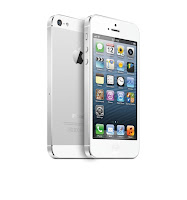 The new iPhone 5 was probably the worst kept Apple introduction. Just about every new feature was known before the actual release. Yes it has a bigger screen, yes it will run on the Sprint & Verizon 4GLTE network (faster Internet), Yes it has a different connector and yes it is made of different material then the other iPhones. Nicely it will cost the same as the iPhone 4s. It is thinner and with a new A6 processor it is much faster then the iPhone 4s. The battery life is 10% better and that is very welcome. So its an all round better phone. Is it breakout new? No, everything changed is evolutionary, not revolutionary. I'm sure the iPhone users out there will soon put this model in short supply
 Motorola Mobility introduced it's first new Droid phones since Google bought the company in May 2012. The new Razr's are in 3 different price ranges and have a common theme - They are bigger, faster and have the best battery life of any cell phones. The entry level Droid Razr M has a 4.3 inch (0.3 inches larger then the iPhone5) edge to edge screen. It is the smallest, in size and weight, 4.3 inch cell phone made today. Motorola uses their kevlar skin technology to make it the lightest also. Battery life is rated at 20 hours, which is more then most Android Cell phones (iPhone 5 rated at 8 hours). The other two Razrs introduced are the Razr HD and the Razr HD Maxx. They both share a 4.7 inch screen (these are BIG phones) with HD (high def 1080p) resolution. They both have the kevlar skins and superior 4G LTE Internet capabilities. The claim to fame of the HD series is battery life. The HD is rated at 24 hours talk time while the Maxx is rated at 32 hours. Note the iPhone rating above. People hate to have to recharge their phones or to have a phone die in the middle of a call. They don't like leaving them plugged in when not in use. These bigger batteries are a new thin technology. If you are not into the iPhone type phones then I believe these new Droids will be winners.
My Verizon cell phone contract is up in November. I think I'll take a real close look at the new phones and make a choice from the ones I've discussed today. Size does matter and I'm not sure I want to wield around a BIG phone no matter what battery life it gets. If you get one of these phones let me know what you think!
The new iPhone 5 was probably the worst kept Apple introduction. Just about every new feature was known before the actual release. Yes it has a bigger screen, yes it will run on the Sprint & Verizon 4GLTE network (faster Internet), Yes it has a different connector and yes it is made of different material then the other iPhones. Nicely it will cost the same as the iPhone 4s. It is thinner and with a new A6 processor it is much faster then the iPhone 4s. The battery life is 10% better and that is very welcome. So its an all round better phone. Is it breakout new? No, everything changed is evolutionary, not revolutionary. I'm sure the iPhone users out there will soon put this model in short supply
My Verizon cell phone contract is up in November. I think I'll take a real close look at the new phones and make a choice from the ones I've discussed today. Size does matter and I'm not sure I want to wield around a BIG phone no matter what battery life it gets. If you get one of these phones let me know what you think!
Subscribe to:
Posts (Atom)


